
Bottom line: Flow diagrams were useless to me for years because the tools drew every path and explained none of them. Shape the paths in BigQuery first, color each flow by whether it ends in a purchase, and add a channel filter, and the same diagram becomes one of the most useful views of a website I have. This post walks through all of it, queries and code included, using Google's public GA4 sample data.
Why I Gave Up on Flow Diagrams
I have to admit that for a long time I looked down on flow diagrams. It goes back to my early days with WebTrends. I would open the path reports, explore them, filter them a dozen different ways, and try to find some angle that made them make sense. I never got anything out of them that helped me improve a website or optimize a marketing campaign.
The problem was not the picture. The problem was that the tool decided what went into the picture. Every page, every loop, every reload, every one-visit dead end, all drawn at once. A diagram with three hundred lines does not show you a path. It shows you a hairball.
What Changed My Mind
Recently a client asked for flow analysis, so I revisited the idea, and I have changed my mind. The difference is where the work happens.
- BigQuery decides what the flow means. The GA4 export gives you every event. In SQL, I can define a step, drop reloads, collapse the long tail of pages, and attach the one thing that matters to every path: did this session buy?
- Chart.js draws only what survived. The open source chartjs-chart-sankey plugin turns a short list of
from,to,flowrows into a Sankey diagram on a plain HTML page. No BI license, no dashboard refresh. - Claude did the heavy lifting. I leaned on Claude to draft the queries, write the Python that builds the page, and test the page in a headless browser. I reviewed every line.
Here is the plan. First, the simplest possible Sankey diagram, so you can see how the chart works. Then the thinking behind turning GA4 data into flows. Then the queries and the Python that produce the page. Then a channel filter. Then the view I find most valuable: channel to landing page to purchase.
The Data: Google's Public GA4 Sample
Everything below runs against the GA4 obfuscated sample ecommerce dataset, the GA4 export from the Google Merchandise Store. It is free to query (you pay only for your own project's usage, and the first terabyte each month is free), and it covers November 1, 2020 through January 31, 2021, one table per day:
SELECT *
FROM `bigquery-public-data.ga4_obfuscated_sample_ecommerce.events_20210131`
LIMIT 1000;
To query all three months at once, use the wildcard table and filter on _TABLE_SUFFIX:
FROM `bigquery-public-data.ga4_obfuscated_sample_ecommerce.events_*`
WHERE _TABLE_SUFFIX BETWEEN '20201101' AND '20210131'
Two things to know about this dataset before you trust anything it says. Some values are deliberately obfuscated (you will see <Other> and (data deleted)), and the only traffic source field is the user's first acquisition source. I come back to that second point in the channel section.
Step 1: The Simplest Sankey Diagram
A Sankey diagram is a list of flows. Each flow has a source node, a target node, and a size. That is the entire data model. Here is the basic sample from the plugin's documentation, with the nodes renamed to something that looks like a website:
<!DOCTYPE html>
<html lang="en">
<head>
<meta charset="UTF-8">
<title>Basic Sankey</title>
<script src="https://cdn.jsdelivr.net/npm/chart.js@4.5.1/dist/chart.umd.min.js"></script>
<script src="https://cdn.jsdelivr.net/npm/chartjs-chart-sankey@0.19.1/dist/chartjs-chart-sankey.min.js"></script>
</head>
<body>
<div style="max-width: 800px; height: 400px;">
  <canvas id="flow"></canvas>
</div>
<script>
  // Each object is one flow: where sessions came from, where they went, how many
  const flows = [
    { from: 'Home',    to: 'Apparel', flow: 10 },
    { from: 'Home',    to: 'Bags',    flow: 5 },
    { from: 'Apparel', to: 'Cart',    flow: 6 },
    { from: 'Apparel', to: 'Exit',    flow: 4 },
    { from: 'Bags',    to: 'Cart',    flow: 4 },
    { from: 'Bags',    to: 'Exit',    flow: 1 },
  ];

  // One color per node; Cart is green so the money path stands out
  const colors = {
    Home: '#0f5c8a', Apparel: '#5b6b7f', Bags: '#5b6b7f',
    Cart: '#1f8a70', Exit: '#c3cad4',
  };

  new Chart(document.getElementById('flow'), {
    type: 'sankey',
    data: {
      datasets: [{
        label: 'Basic flow',
        data: flows,
        colorFrom: (c) => colors[c.dataset.data[c.dataIndex].from],
        colorTo:   (c) => colors[c.dataset.data[c.dataIndex].to],
        colorMode: 'gradient',
      }],
    },
    options: { maintainAspectRatio: false },
  });
</script>
</body>
</html>
Save that as an .html file, open it in a browser, and you have a working flow diagram.
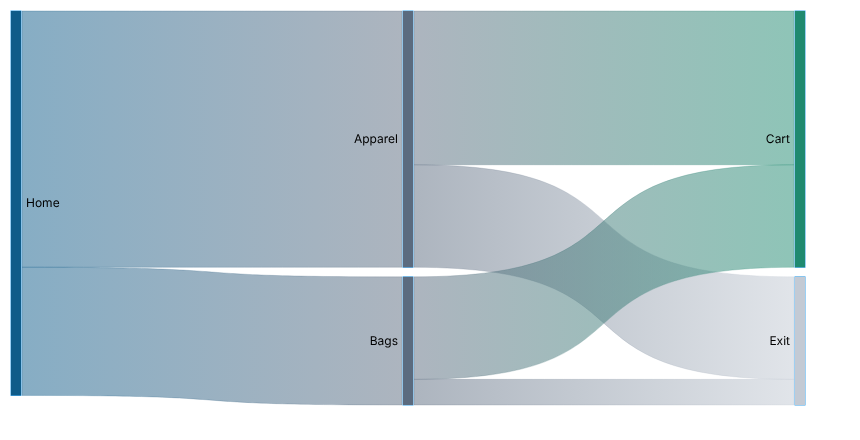
Three things in that example matter for everything that follows:
colorFromandcolorToare functions. They receive the flow being drawn, so the color can depend on anything in the data. Later, we will color every flow by its purchase rate. That one idea is what makes the chart useful.- The plugin's own sample calls
Utils.getColor(). That helper exists only on the documentation site. Copy the sample as-is and you get a blank chart and a console error. Use your own color map, as above. - A Sankey diagram cannot loop. Real visitors go Home, then Apparel, then back to Home. If you feed that to the chart as
Home → ApparelandApparel → Home, you create a cycle and the layout breaks. The fix is in the next section.
Step 2: Turning GA4 Events Into Flows
This is the part the old tools skipped, and it is where the value is. Before writing any SQL, decide five things:
- What is a step? A page view within a session. GA4 sessions are identified by
user_pseudo_idplus thega_session_idevent parameter. - What is noise? A reload. If the same page fires twice in a row, count it once.
- How do we avoid loops? Prefix every node with its step number.
1. /and3. /are different nodes, so the home page can appear twice without creating a cycle. This one trick is why the diagram reads left to right. - How much do we show? The first three pages of each session, and only the top ten pages. Everything else becomes
(other pages). A flow diagram earns its keep by leaving things out. - What is the outcome? Every session ends in one of two nodes:
PurchasedorNo purchase. The outcome covers the whole session, so a session that buys on page seven still counts asPurchasedat the end of its three-page path.
Step 3: The Landing Page Flow Query
Here is the query that implements those five decisions. It returns one row per flow, with the number of sessions on that flow and how many of them purchased.
-- Query 1: first three pages of each session, ending in a purchase outcome
DECLARE start_date STRING DEFAULT '20201101';
DECLARE end_date   STRING DEFAULT '20210131';
DECLARE max_steps  INT64  DEFAULT 3;
DECLARE top_n      INT64  DEFAULT 10;

WITH events AS (
  SELECT
    user_pseudo_id,
    (SELECT value.int_value FROM UNNEST(event_params) WHERE key = 'ga_session_id') AS session_id,
    event_name,
    event_timestamp,
    (SELECT value.string_value FROM UNNEST(event_params) WHERE key = 'page_location') AS page_location
  FROM `bigquery-public-data.ga4_obfuscated_sample_ecommerce.events_*`
  WHERE _TABLE_SUFFIX BETWEEN start_date AND end_date
    AND event_name IN ('page_view', 'purchase')
),

page_views AS (
  SELECT
    user_pseudo_id,
    session_id,
    event_timestamp,
    -- strip protocol, host, query string, and fragment; keep the path
    IFNULL(
      NULLIF(REGEXP_REPLACE(REGEXP_REPLACE(page_location, r'^https?://[^/]+', ''), r'[?#].*$', ''), ''),
      '/'
    ) AS page
  FROM events
  WHERE event_name = 'page_view'
    AND session_id IS NOT NULL
    AND page_location IS NOT NULL
),

deduped AS (
  -- drop reloads: a page view of the same page as the previous one
  SELECT * EXCEPT (prev_page)
  FROM (
    SELECT
      *,
      LAG(page) OVER (PARTITION BY user_pseudo_id, session_id ORDER BY event_timestamp) AS prev_page
    FROM page_views
  )
  WHERE prev_page IS NULL OR prev_page != page
),

stepped AS (
  SELECT
    user_pseudo_id,
    session_id,
    page,
    ROW_NUMBER() OVER (PARTITION BY user_pseudo_id, session_id ORDER BY event_timestamp) AS step
  FROM deduped
),

top_pages AS (
  SELECT page
  FROM stepped
  WHERE step <= max_steps
  GROUP BY page
  QUALIFY ROW_NUMBER() OVER (ORDER BY COUNT(*) DESC) <= top_n
),

purchasers AS (
  SELECT DISTINCT user_pseudo_id, session_id, TRUE AS purchased
  FROM events
  WHERE event_name = 'purchase' AND session_id IS NOT NULL
),

session_paths AS (
  SELECT
    s.user_pseudo_id,
    s.session_id,
    ARRAY_AGG(IF(t.page IS NULL, '(other pages)', s.page) ORDER BY s.step) AS pages
  FROM stepped AS s
  LEFT JOIN top_pages AS t ON s.page = t.page
  WHERE s.step <= max_steps
  GROUP BY s.user_pseudo_id, s.session_id
),

sessions AS (
  SELECT
    sp.pages,
    IFNULL(p.purchased, FALSE) AS converted
  FROM session_paths AS sp
  LEFT JOIN purchasers AS p USING (user_pseudo_id, session_id)
),

links AS (
  -- page to page: "1. /home" -> "2. /apparel"
  SELECT
    FORMAT('%d. %s', i + 1, pages[OFFSET(i)]) AS source,
    FORMAT('%d. %s', i + 2, pages[OFFSET(i + 1)]) AS target,
    converted
  FROM sessions, UNNEST(GENERATE_ARRAY(0, ARRAY_LENGTH(pages) - 2)) AS i
  UNION ALL
  -- last page shown -> outcome of the whole session
  SELECT
    FORMAT('%d. %s', ARRAY_LENGTH(pages), pages[OFFSET(ARRAY_LENGTH(pages) - 1)]),
    IF(converted, 'Purchased', 'No purchase'),
    converted
  FROM sessions
)

SELECT
  source,
  target,
  COUNT(*) AS sessions,
  COUNTIF(converted) AS converting_sessions
FROM links
GROUP BY source, target
ORDER BY sessions DESC;
A few notes on how it works:
dedupedusesLAG()to compare each page view to the one before it in the same session. Reloads disappear.steppednumbers what is left. Step 1 is the landing page.session_pathspacks each session's first three pages into an array, with the long tail already bucketed.linksunpacks the array into pairs.GENERATE_ARRAY(0, ARRAY_LENGTH(pages) - 2)produces one index per page-to-page hop, and a one-page session simply produces none. The second half of theUNION ALLadds the final hop from the last page to the outcome.- The output is exactly the shape the chart wants:
source,target,sessions, plusconverting_sessions, which is what we will color by.
Step 4: From Query Results to an HTML Page
The Python script does three things: runs the query, drops the rows into a JSON object, and writes that JSON into an HTML template. No server, no framework. The result is a single file you can email, host, or open locally.
The core of it is short:
from google.cloud import bigquery

def run_query(client, sql):
    rows = client.query(sql).result()  # for a multi-statement script, returns the final SELECT
    return [
        {
            "channel": r["channel"],
            "source": r["source"],
            "target": r["target"],
            "sessions": int(r["sessions"]),
            "converting_sessions": int(r["converting_sessions"]),
        }
        for r in rows
    ]

def build_html(page_rows, landing_rows, subtitle):
    channels = sorted({r["channel"] for r in page_rows} | {r["channel"] for r in landing_rows})
    payload = {"pages": page_rows, "landing": landing_rows,
               "channels": channels, "subtitle": subtitle}
    # Escape "</" so a page path can never close the <script> tag early.
    data_json = json.dumps(payload).replace("</", "<\\/")
    return HTML_TEMPLATE.replace("__DATA__", data_json)
Inside the template, the page reads const DATA = __DATA__; and hands the flows to Chart.js. The important part is the color function. Every flow is colored by its own purchase rate, compared to the purchase rate of all sessions in the current view:
// gray at 0% purchase rate, full green at twice the baseline
function colorFor(f, base) {
  if (f.to === 'Purchased') return 'rgba(31,138,112,0.85)';
  if (f.to === 'No purchase') return 'rgba(195,202,212,0.55)';
  const t = base > 0 ? Math.min((f.conv / f.flow) / (2 * base), 1) : 0;
  const c = GRAY.map((g, i) => Math.round(g + (GREEN[i] - g) * t));
  return `rgba(${c[0]},${c[1]},${c[2]},0.7)`;
}
That is the change that made me take flow diagrams seriously. The width of a flow tells you how many people took it. The color tells you whether it made money. A wide gray flow is traffic that goes nowhere. A thin, bright green flow is a path worth scaling.
One lesson from testing: hide small flows to keep the chart readable, but never hide flows into Purchased. Purchases are rare, so almost every purchase flow is small. My first draft filtered them out, which removed the one thing the chart exists to show.
const minFlow = sessions * minPct / 100;
return { flows: all.filter(f => f.flow >= minFlow || f.to === 'Purchased'), sessions, buyers };
The complete script, including the HTML template, is here: build_flow_report.py. Run it like this:
pip install google-cloud-bigquery
gcloud auth application-default login
python build_flow_report.py --project YOUR_BILLING_PROJECT --out flow_report.html
Step 5: Add a Channel Filter
An all-traffic flow diagram blends visitors who arrived with intent and visitors who arrived by accident. Splitting by channel is where the diagram starts answering marketing questions.
The query change is small. Add the traffic source to the events CTE, derive a channel for each session, and carry channel through to the output:
-- in the events CTE, add:
    traffic_source.source AS user_source,
    traffic_source.medium AS user_medium

-- new CTE:
session_channel AS (
  SELECT
    user_pseudo_id,
    session_id,
    CASE
      WHEN src = '(direct)' AND med IN ('(none)', '(not set)') THEN 'Direct'
      WHEN med = 'organic' THEN 'Organic Search'
      WHEN med IN ('cpc', 'ppc', 'paid') THEN 'Paid Search'
      WHEN med = 'referral' THEN 'Referral'
      WHEN med IN ('display', 'cpm', 'banner') THEN 'Display'
      ELSE 'Other'
    END AS channel
  FROM (
    SELECT user_pseudo_id, session_id, ANY_VALUE(user_source) AS src, ANY_VALUE(user_medium) AS med
    FROM events
    WHERE session_id IS NOT NULL
    GROUP BY user_pseudo_id, session_id
  )
)

-- then join it in the sessions CTE and add channel to links and the final GROUP BY
On the page, the filter does not re-query anything. Every row already carries its channel, so the browser simply sums the rows for whichever channel you pick:
function aggregate(rows, channel, minPct) {
  const byLink = new Map();
  for (const r of rows) {
    if (channel !== 'All channels' && r.channel !== channel) continue;
    const key = r.source + '\u0000' + r.target;
    const f = byLink.get(key) || { from: r.source, to: r.target, flow: 0, conv: 0 };
    f.flow += r.sessions;
    f.conv += r.converting_sessions;
    byLink.set(key, f);
  }
  // ...
}
The baseline purchase rate is recalculated for each channel, so the green always means "better than typical for this channel," not "better than the site average." That keeps the colors honest when you compare a high-intent channel to a low-intent one.
A caution on this dataset. The 2020 sample only has traffic_source, which is the user's first acquisition source. A user who first arrived from organic search and came back through an email is still labeled Organic Search. On a live GA4 property, use the session-level session_traffic_source_last_click field instead, which Google added to the export in 2024. The rest of the query is the same.
Step 6: Channel to Landing Page to Purchase
Once the basics work, this is the view I find most valuable. Three columns: the channel that sent the visitor, the page they landed on, and whether they bought. Same conversion coloring, same channel filter.
It reuses every CTE from the channel version down through session_channel, then replaces the rest:
top_landing AS (
  SELECT page
  FROM stepped
  WHERE step = 1
  GROUP BY page
  QUALIFY ROW_NUMBER() OVER (ORDER BY COUNT(*) DESC) <= top_n
),

sessions AS (
  SELECT
    IFNULL(c.channel, 'Other') AS channel,
    CONCAT('Landing: ', IF(t.page IS NULL, '(other pages)', s.page)) AS landing_node,
    IFNULL(p.purchased, FALSE) AS converted
  FROM stepped AS s
  LEFT JOIN top_landing AS t ON s.page = t.page
  LEFT JOIN session_channel AS c ON s.user_pseudo_id = c.user_pseudo_id AND s.session_id = c.session_id
  LEFT JOIN purchasers AS p ON s.user_pseudo_id = p.user_pseudo_id AND s.session_id = p.session_id
  WHERE s.step = 1
),

links AS (
  SELECT channel, channel AS source, landing_node AS target, converted FROM sessions
  UNION ALL
  SELECT channel, landing_node, IF(converted, 'Purchased', 'No purchase'), converted FROM sessions
)

SELECT
  channel,
  source,
  target,
  COUNT(*) AS sessions,
  COUNTIF(converted) AS converting_sessions
FROM links
GROUP BY channel, source, target
ORDER BY sessions DESC;
Landing nodes get a Landing: prefix so a page can never collide with a channel name. Both views ship in the same HTML file, with a toggle between them.

What to Look For
Here is how I read the channel to landing page view with a client:
- Wide and gray. A channel sending a lot of traffic to a landing page that rarely converts. Either the targeting is wrong or the page is. Look here first for wasted spend.
- Thin and green. A landing page that converts well above baseline but gets little traffic. Look here first for growth: send it more of the channel that already works.
- The same page, two colors. One landing page that is green from one channel and gray from another. The page is not the problem; the promise that brought people there is. That is a creative or keyword conversation, not a web design conversation.
- The second step. Switch to the page path view and filter to one channel. If most purchasers pass through the same second page, that page belongs in your landing page design and your navigation.
What This Does Not Show
Every report we deliver states what it does not cover, so here is the list for this one:
- Only the first three pages. Sessions that wander for ten pages before buying are counted at the end, but the middle of their path is not drawn.
- Purchase only. Lead forms, sign-ups, and add-to-carts are not in these queries. Swap
'purchase'for any key event to change the outcome. - First-touch channel in the sample. See the caution above. A live property should use session-level source.
- Sessions, not users. A user who visits three times is three sessions. That is right for landing page analysis and wrong for customer journey analysis.
- Correlation, not cause. A green flow tells you where buyers went. It does not prove the page made them buy. Test before you redesign.
The Larger Point
I did not change my mind about flow diagrams because the charts got prettier. I changed my mind because the data underneath them got deliberate. Define the step, remove the noise, attach the outcome, and a picture that used to be decoration becomes a decision tool.
If you want to see what this looks like on your own GA4 data, a Trionia assessment can include it. Contact me at jmurphy@trionia.com.




0 Comments: